
Languages
Main menu
THUG now speaks ten languages. The menus, the button hints, every goal, the whole story (goal intros, chapters, cutscene titles), the tips and the in-game messages. Trick names, gap names and people's names stay the way the skaters say them. One small file per language: download it, drop it into the game's Data/Lang folder, pick it in Options › Language.

Options › Language
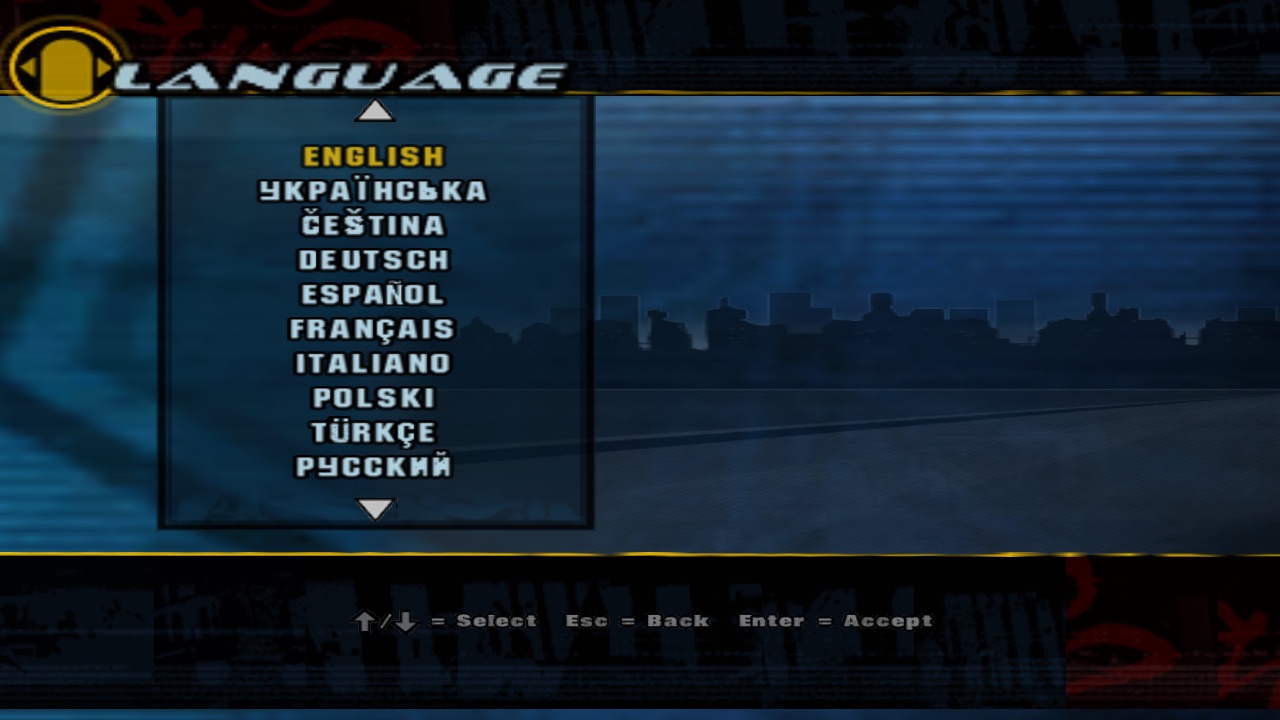
Every language you've put in Data/Lang lights up here. The rest stay greyed out. It switches on the spot, no restart, and the game remembers it.
Back in 2003…
…THUG shipped knowing how to say “loading” three ways. These are its own loading screens, straight out of the retail Data/images.
 EN
EN FR
FR DE
DE
Now: ten.
Pick your language
| Flag | Language | File | Download |
|---|---|---|---|
| EnglishThe game's own text | built in | Already in the game | |
| УкраїнськаUkrainian | uk.lng 152 KB |
Download | |
| ČeštinaCzech | cs.lng 150 KB |
Download | |
| DeutschGerman | de.lng 148 KB |
Download | |
| EspañolSpanish | es.lng 149 KB |
Download | |
| FrançaisFrench | fr.lng 147 KB |
Download | |
| ItalianoItalian | it.lng 146 KB |
Download | |
| PolskiPolish | pl.lng 151 KB |
Download | |
| TürkçeTurkish | tr.lng 148 KB |
Download | |
| РусскийRussian | ru.lng 152 KB |
Download |
Want them all? One zip with every language, already in its Data/Lang folder: unzip it into the game folder, just like the patch.
Where to put the file
-
Download your language
From the list above. Keep the name as it is:
de.lngfor German,fr.lngfor French and so on. -
Open your game folder
The one you unzipped the patch into: it holds
THUG.exe(on macOS and Linux justTHUG) and theDatafolder. -
Make a Lang folder in Data
Open
Dataand create a new folder named Lang, right next toscriptsandimages. Already there? Use it. -
Drop the file in
It ends up as
Data/Lang/de.lng. Put in as many languages as you like, one file each. -
Start the game, pick it
Options › Language and choose yours. It switches right away and stays chosen next time.
Your game folder
- THUG
- THUG.exe THUG on macOS and Linux
- Data
- images
- scripts
- Lang make this one
- de.lng your language
needs: patch 1.7 or newer (get it here).
Windows
C:\Games\THUG\Data\Lang\de.lng
Data › New › Folder.
macOS
~/Games/THUG/Data/Lang/de.lng
Data, File › New Folder.
Linux
~/Games/THUG/Data/Lang/de.lng
mkdir -p Data/Lang in the game folder.
Paths are examples: your game folder is wherever you installed the game. Capitals don't matter to the game: Lang and lang both work.
Not working?
My language is greyed out in Options
The game can't see the file. Check it's in Data/Lang inside the game folder (not in your Downloads, not inside Data/scripts), and that it's still called xx.lng, not de (1).lng or de.lng.txt. Then quit the game completely and start it again: it looks for the files when it starts.
Some text is still in English
That's on purpose for trick names, gap names, names of people and brands, the credits and the legal text. The HUD and the title graphics are pictures, so they stay as they were drawn. Anything else in English that should be translated? Tell us at [email protected], with a screenshot if you can.
A translation reads wrong
Native speakers welcome. Send the line you saw and how it should read to [email protected] and it goes into the next update of that file.
Does it change anything online?
No. The language is only what your game shows you. You can skate with anyone, whatever language they picked.
<Enter> = Pick a language<Esc> = Back to the menu